

Dear CFOs and finance leaders,
Imagine it’s 10:52 pm on the night before the board meeting, and the deck goes to your CEO at seven. Your CEO has asked twice this quarter why AI isn’t writing the commentary yet, so tonight you let it.
You hand the assistant the opex file your analyst exported on day three of close, and a minute later it gives you clean, well-sourced commentary: opex is over budget, almost entirely because of a big marketing campaign accrual.
It even adds a polite caveat that someone should confirm the timing with the budget owner. It’s late, the sentence reads well, and you paste it in.
At 11:40 you open the ledger to grab one last number, and it doesn’t tie. The agency’s revised invoice arrived on day four. The campaign slipped to next quarter, almost nothing was billed this month, and on day five accounting reversed the accrual.
The overrun your AI explained so carefully no longer exists. Nothing in the paragraph was false about the file. Everything in it was false about your business.
AI didn’t get your number wrong.
It read an old Excel export, and that file went stale the moment someone hit export.
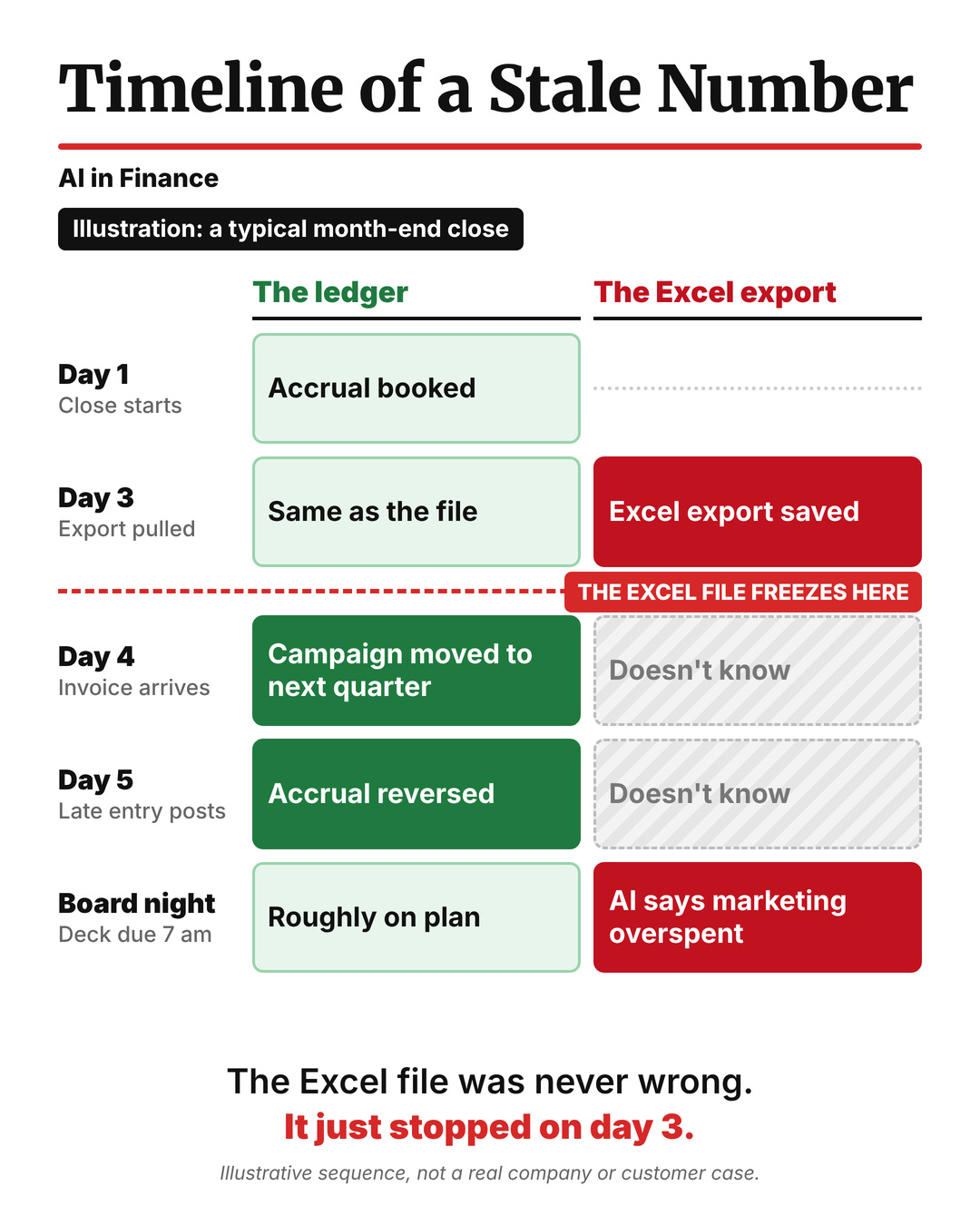
The Excel file did nothing wrong.
It was accurate at 9:14 on day three, and it stayed a picture of day three forever.
The ledger kept moving, the Excel file didn’t, and the AI read the Excel file. Every finance team has a version of this file: the CSV in the shared drive, the “final” tab in the forecast model, the numbers pasted into slide 41 of the board deck. Each one is a photograph of the business taken at a moment nobody wrote down.
None of this is new.
JPMorgan’s London Whale trade lost at least $6.2 billion, while the model meant to measure its risk ran on spreadsheets filled in “by a process of copying and pasting data from one spreadsheet to another.”

What’s new is that AI turns a stale Excel file into fluent, confident prose in seconds, and fluent prose is much harder to doubt than a cell in a spreadsheet.
The real cost of disconnected data
Time. Your best analysts spend more time proving the Excel export matches the ledger than explaining what the numbers mean, as the FP&A Trends Survey 2026 shows year after year.
Trust. Only one CFO in ten fully believes the data, and in RGP’s research that doubt is the single biggest thing standing between AI and a return on it. In BlackLine’s survey, the people closest to the numbers trusted them least.
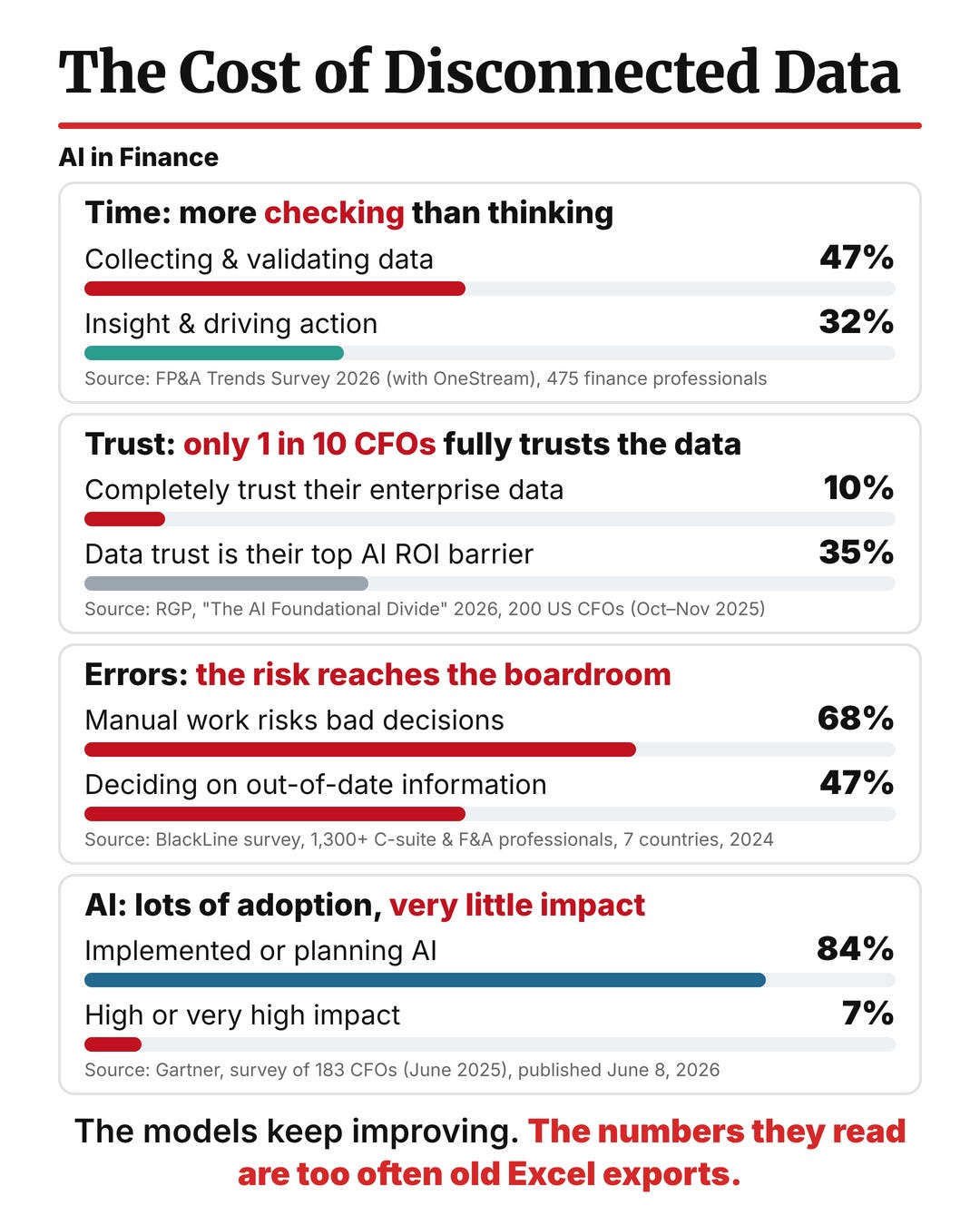
Errors and decisions. Two-thirds of finance leaders in the same BlackLine survey said manual work exposes them to errors that could undermine decisions. That is the board-night scene, measured across an entire survey of finance leaders.
AI impact. Finance is not short of AI, but Gartner’s data shows only a sliver of finance teams see real impact from it. When the data underneath is scattered and stale, the AI on top inherits every one of those costs and adds speed and confidence to them.
Why AI fails on Excel data
Every AI answer in finance sits on a stack of layers.
At the bottom is the live ledger, with every transaction as it posts. Above it sit your roles and permissions, then your definitions (the chart of accounts, dimensions, and owners), then the question the CFO actually asks.
The AI’s answer sits at the very top, and most AI pilots start there.
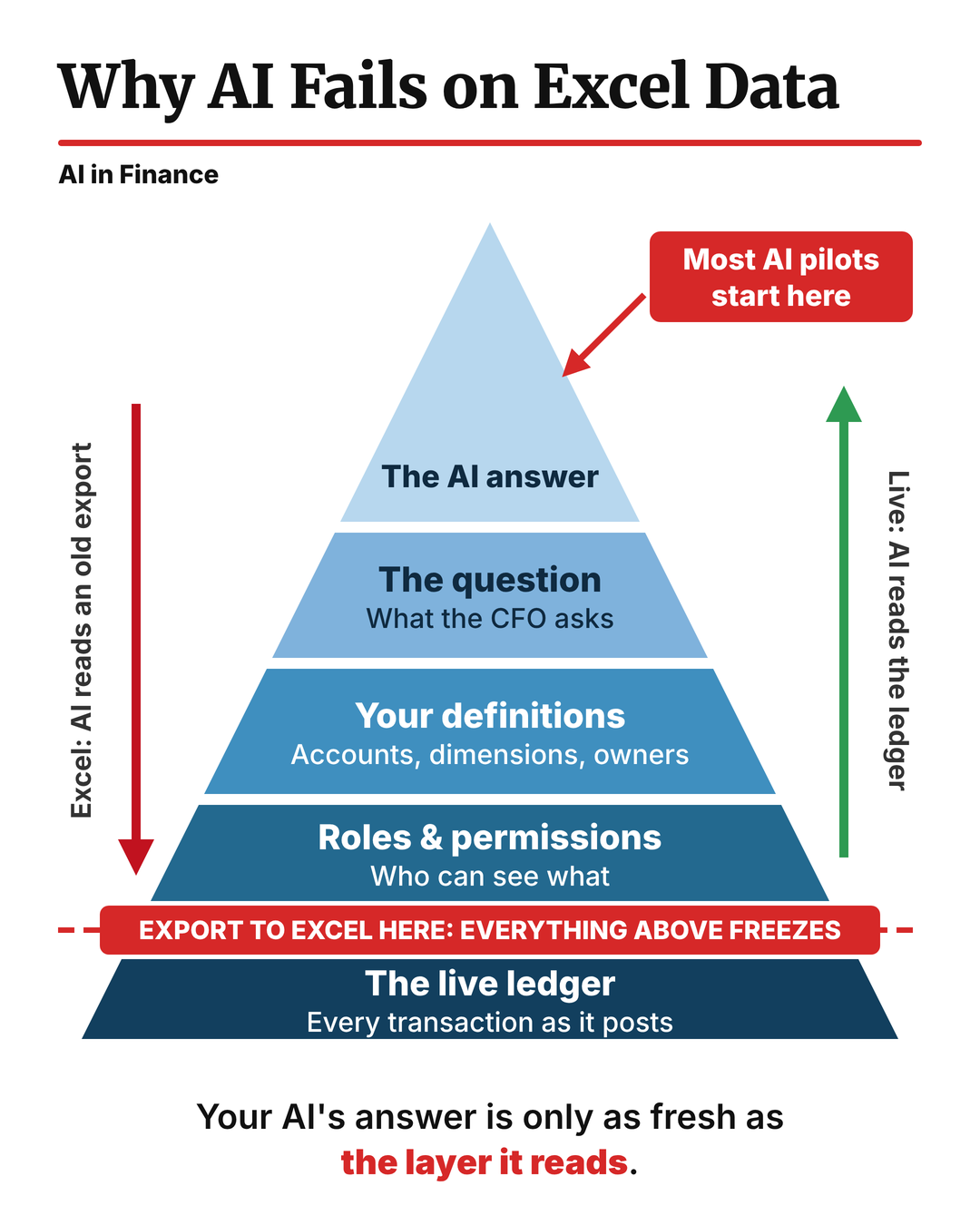
An export cuts the pyramid just above the ledger. Everything above that line freezes at the moment of the export, and your permissions, dimensions, and late entries fall off with it. That’s why better prompts never fix a stale file: you’re polishing the top of a pyramid whose foundation stopped updating on day three.
Make NetSuite the live ledger your AI reads
The fix is not a better model.
It’s a shorter road between the question and the ledger, and that’s the gap NetSuite, which sponsors this series, is built to close.
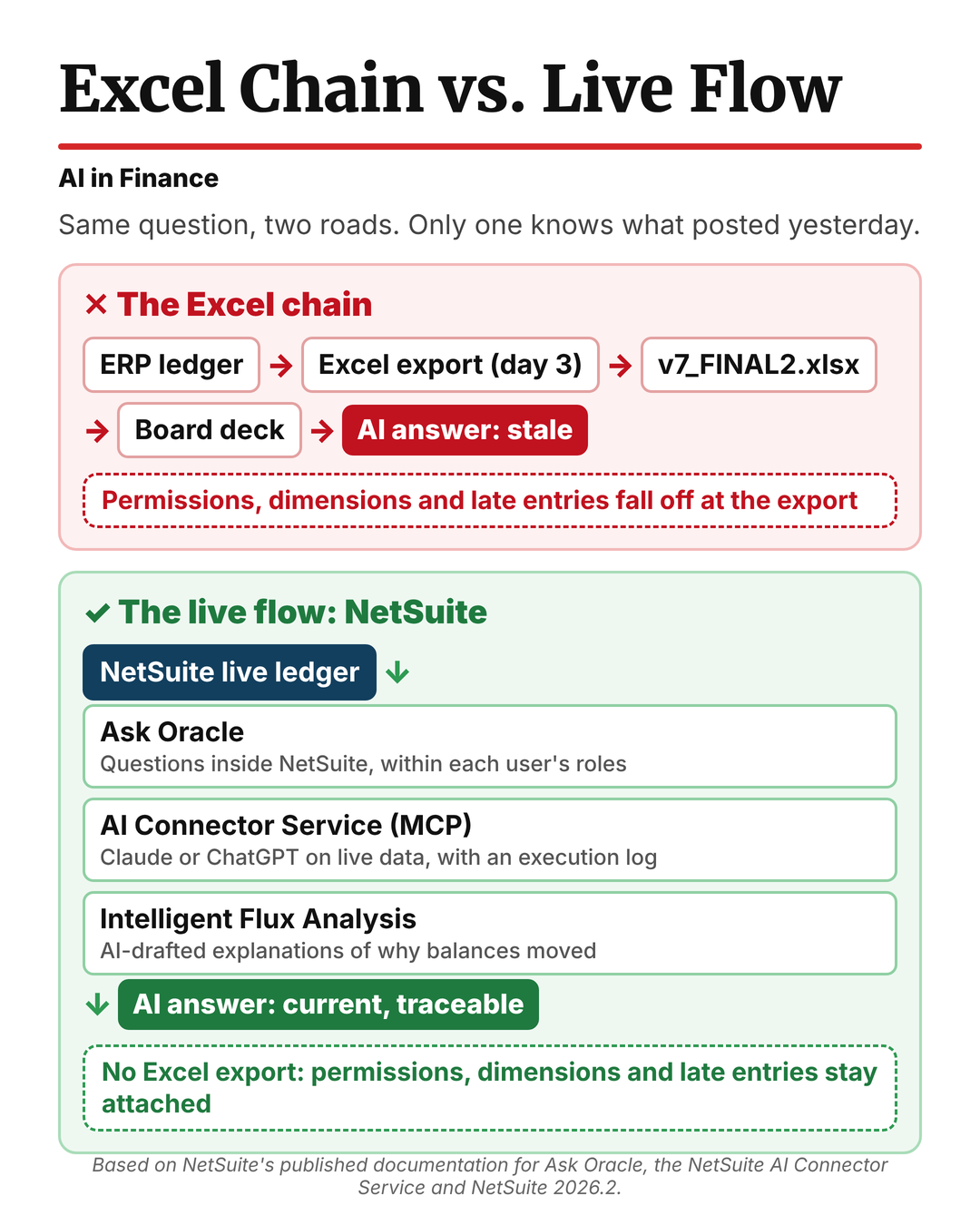
The Excel chain is the road most teams drive today: ledger, export, spreadsheet, deck, and AI. Every arrow is a place where a late entry, a permission, or a dimension falls off. NetSuite removes the arrows. Financials and operations run on one unified data model, so the ledger the AI reads is the same ledger your team posts to, updated as each transaction lands. NetSuite’s founder, Evan Goldberg, put it plainly at SuiteWorld 2025:
“AI doesn’t just guess. It starts from the source because your data is unified.”
That unified source now has three AI doors, and each one changes something specific in a CFO’s week.
Ask Oracle came into the current NetSuite experience with release 2026.2, which began rolling out to US and Canadian customers on July 15, 2026. It answers questions inside NetSuite within each user’s existing roles and permissions, and its Show explanation button shows how it built the answer. The variance question on board night gets asked where the invoice actually landed.
The NetSuite AI Connector Service brings the same live data to the assistants your team already uses, such as Claude or ChatGPT, through the Model Context Protocol. It runs through a non-administrator role, so the AI sees only what that role can see, and every call is recorded in an execution log your auditor can review. Nobody exports a CSV to feed the chat window.
Intelligent Flux Analysis, also new in 2026.2, uses AI to draft explanations of why account balances changed between periods, right from the close. The first draft of the flux commentary starts from posted entries rather than from the day-three file.
Go back to board night with that setup. The question is the same, and so is the model. But the answer now includes the day-four invoice and the day-five reversal, with a link to the entry that changed the story, and you go to bed at eleven.
A live connection makes your AI exactly as good as your ledger. If your chart of accounts has three overlapping travel accounts, or subsidiaries were mapped in a hurry after an acquisition, the AI will read that mess accurately and in real time. Budget time for that cleanup before you roll AI out across the close.
Live Ledger or Excel Export?
Screenshot this and take it into your next close review.
Answer it for every AI workflow your team runs, from variance commentary to board-pack drafts, and ask your team rather than your vendor.
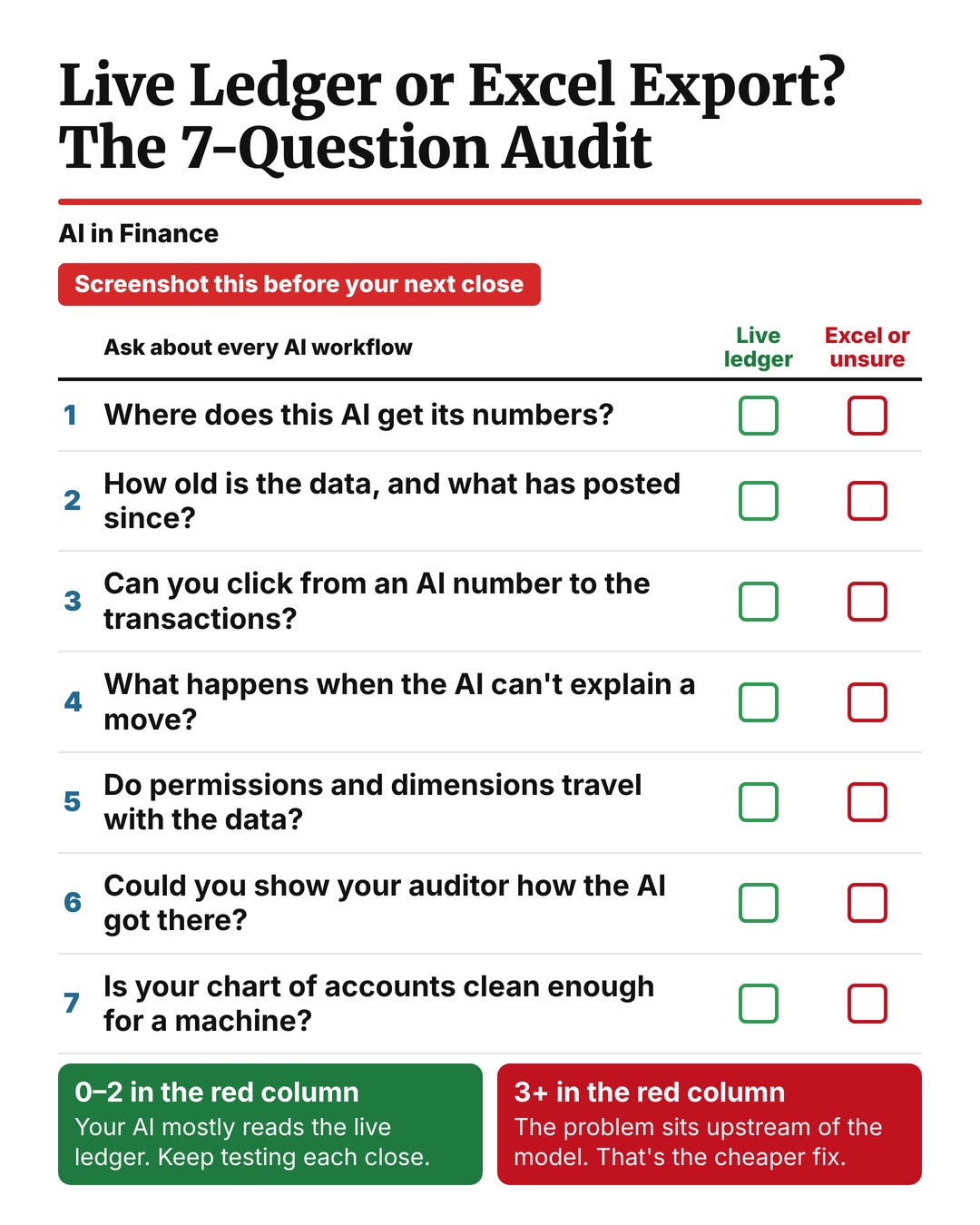
If three or more land in the Excel column, the problem sits upstream of the model, and that’s the cheaper fix.
Want to go further?
NetSuite's 2026 AI-Powered Financial Analysis Handbook walks through how finance teams are setting up AI on live data.
The Bottom Line
AI keeps failing in finance because we hand it numbers that went stale the moment someone hit export, and then we blame the reader for what was on the page.
A smarter model can’t read an invoice that isn’t in the file.
Before you buy another AI tool, find out what your current one is actually reading. Most of you will find it’s an Excel export, and the fix is a live ledger, not a new model.
Team at finstory
finstory.ai builds reporting tools that connect to ERPs, including NetSuite.
Find us on LinkedIn | finstory.ai

AI is only as smart as you make it. Ensuring it has the most accurate data is key to its success, which can be challenging. We face the challenge of getting the most up to date market data to be able to trade accurately and timely. Great article.
Before buying anything, stamp the export time in the first line of every file the AI reads. Then have the AI print that time at the top of its commentary. On board night, a line saying "data as of 9:14, day three" would sit right above the overrun. That alone might have sent you to the ledger before you pasted it in.